1. 카테고리 별 총 금액을 구했으니, 이제 차트로 보여줘보자.
- expenses.dart
body: Column(
children: [
Chart(expenses: _registeredExpenses),
Expanded(child: mainContent),
],
),
1) Chart 위젯 추가
-chart.dart
import 'package:expense_tracker/wigets/chart/chart_bar.dart';
import 'package:flutter/material.dart';
import 'package:expense_tracker/models/expense.dart';
class Chart extends StatelessWidget {
const Chart({super.key, required this.expenses});
final List<Expense> expenses;
List<ExpenseBucket> get buckets {
return [
ExpenseBucket.forCategory(expenses, Category.food),
ExpenseBucket.forCategory(expenses, Category.leisure),
ExpenseBucket.forCategory(expenses, Category.travel),
ExpenseBucket.forCategory(expenses, Category.work),
];
}
double get maxTotalExpense {
double maxTotalExpense = 0;
for (final bucket in buckets) {
if (bucket.totalExpenses > maxTotalExpense) {
maxTotalExpense = bucket.totalExpenses;
}
}
return maxTotalExpense;
}
@override
Widget build(BuildContext context) {
final isDarkMode =
MediaQuery.of(context).platformBrightness == Brightness.dark;
return Container(
margin: const EdgeInsets.all(16),
padding: const EdgeInsets.symmetric(
vertical: 16,
horizontal: 8,
),
width: double.infinity,
height: 180,
decoration: BoxDecoration(
borderRadius: BorderRadius.circular(8),
gradient: LinearGradient(
colors: [
Theme.of(context).colorScheme.primary.withOpacity(0.3),
Theme.of(context).colorScheme.primary.withOpacity(0.0)
],
begin: Alignment.bottomCenter,
end: Alignment.topCenter,
),
),
child: Column(
children: [
Expanded(
child: Row(
crossAxisAlignment: CrossAxisAlignment.end,
children: [
for (final bucket in buckets) // alternative to map()
ChartBar(
fill: bucket.totalExpenses == 0
? 0
: bucket.totalExpenses / maxTotalExpense,
)
],
),
),
const SizedBox(height: 12),
Row(
children: buckets
.map(
(bucket) => Expanded(
child: Padding(
padding: const EdgeInsets.symmetric(horizontal: 4),
child: Icon(
categoryIcons[bucket.category],
color: isDarkMode
? Theme.of(context).colorScheme.secondary
: Theme.of(context)
.colorScheme
.primary
.withOpacity(0.7),
),
),
),
)
.toList(),
)
],
),
);
}
}
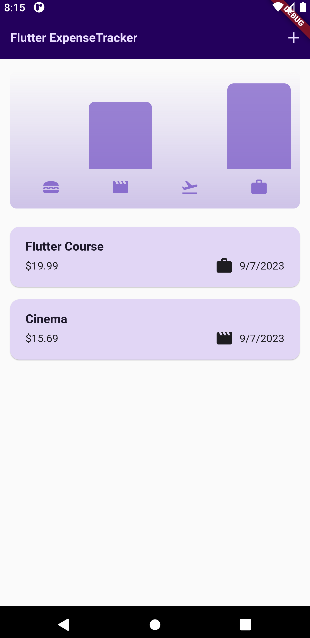
1) buckets 함수에 4개의 인스턴스가 리스트에 저장된다.
2) get 함수인 maxTotalExpense 부분은 최고 금액을 지정해주는 것이다. 그 이유는 최고 금액대가 차트에서 가장 높은 것을 차지 하고 다른 카테고리 금액은 그 최고가 기준 대비 %로 화면에 보여주어야 하기 때문이다.
- 최고가 100% / 다른 카테고리 60% 이런식으로 차트로 표현
3) MediaQuery부분을 활용해서 현재 시스템상 다크모드인지 아닌지 확인 할 수 있고 그거에 따라 삼항연산자로 컬러 지정을 할 수 있다.
4) ChartBar위젯 사용하여 구현
- chart_bar.dart
import 'package:flutter/material.dart';
class ChartBar extends StatelessWidget {
const ChartBar({
super.key,
required this.fill,
});
final double fill;
@override
Widget build(BuildContext context) {
final isDarkMode =
MediaQuery.of(context).platformBrightness == Brightness.dark;
return Expanded(
child: Padding(
padding: const EdgeInsets.symmetric(horizontal: 4),
child: FractionallySizedBox(
heightFactor: fill,
child: DecoratedBox(
decoration: BoxDecoration(
shape: BoxShape.rectangle,
borderRadius:
const BorderRadius.vertical(top: Radius.circular(8)),
color: isDarkMode
? Theme.of(context).colorScheme.secondary
: Theme.of(context).colorScheme.primary.withOpacity(0.65),
),
),
),
),
);
}
}
- 결과 화면
'코딩강의 > expense_tracker(플러터-유데미)' 카테고리의 다른 글
| ~128. Adding Alternative Constructor Functions & Filtering Lists (0) | 2023.09.06 |
|---|---|
| 126. Adding Dark Mode (0) | 2023.09.05 |
| ~125. Using Theme Data in Widgets (0) | 2023.09.04 |
| 121. Showing & Managing "Snackbars" (0) | 2023.09.03 |
| 120. Using the Dismissible Widget for Dismissing List Items (0) | 2023.09.03 |

